

Introduction
Network TAP mounting options determine how network visibility, packet capture, and security monitoring equipment is installed within data centers, enterprise networks, industrial cabinets, and remote locations. Choosing the right mounting method helps engineers maintain reliable connectivity, organized cabling, secure physical installation, and continuous access to network traffic.
NEOX Networks provides network visibility solutions for different infrastructure requirements, including Network TAPs, packet brokers, data diodes, and packet capture appliances. Depending on the product model and available accessories, these solutions can support rack-mounted, DIN-rail, portable, and other deployment configurations for IT, OT, and security monitoring environments.
This guide explains common mounting options, installation considerations, field applications, and how to select the appropriate NEOX configuration for your network infrastructure.
What Are Network Device Mounting Options?
Network device mounting options describe the physical methods used to install and secure network equipment in its intended operating environment. These options determine where a device sits, how it connects to the network, how cables are routed, and how engineers access it for maintenance.
For network visibility infrastructure, mounting is particularly important because Network TAPs, packet brokers, and packet capture appliances must provide monitoring access without disrupting production traffic.
Common mounting options include:
- Rack mounting: Installing equipment in a standard equipment rack or cabinet.
- DIN-rail mounting: Securing compatible devices to standardized rails inside industrial control cabinets.
- Portable installation: Using compact equipment for fieldwork, temporary monitoring, and on-site troubleshooting.
- Standalone placement: Positioning equipment on a suitable, stable surface.
- Bracket and frame mounting: Using compatible accessories to secure equipment within a rack or installation space.
- Hardened installation: Deploying equipment designed for demanding industrial or critical-infrastructure environments.
The available options depend on the product’s mechanical design, accessories, and installation requirements.
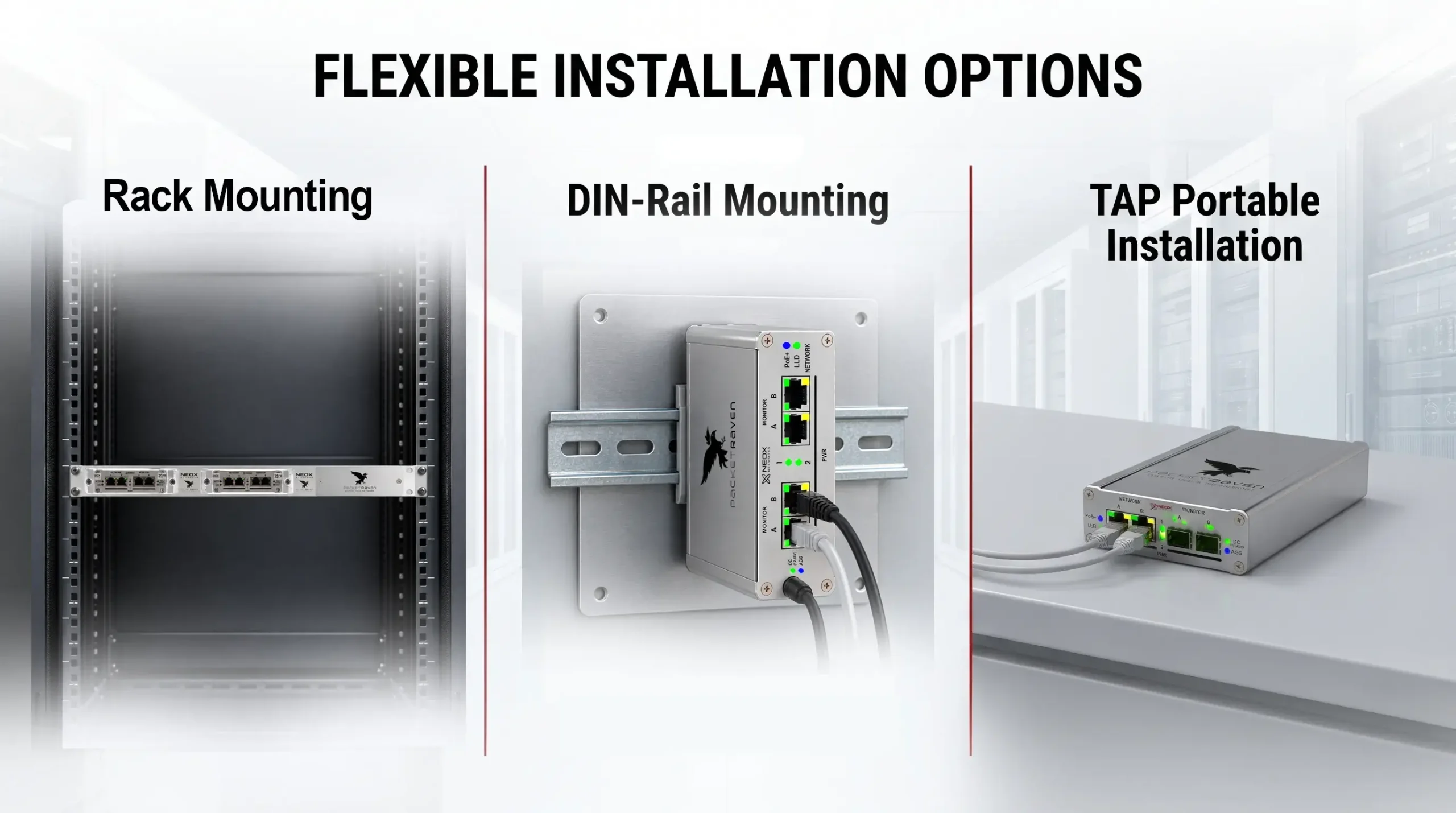
Diagram 1 : Compare rack, DIN-rail, portable, standalone, and bracket-based installation methods.
Types of NEOX Mounting and Installation Options
1. Rack-Mounted Network Visibility Equipment
Rack mounting is commonly used in enterprise data centers, server rooms, network operation centers, and security infrastructure. It provides a structured way to install network devices alongside switches, servers, storage systems, and monitoring appliances.
Rack-mounted network visibility equipment can include:
- Network packet brokers for traffic aggregation and distribution.
- Network TAPs for passive access to network traffic.
- Packet capture appliances for full packet capture and network forensics.
- Data diode systems for secure, unidirectional data transfer.
A rack-based installation helps organize cabling, centralize equipment, and simplify access for maintenance. Engineers should verify rack-unit requirements, mounting brackets, power connections, airflow, grounding, and cable clearance before installation.
NEOX applications: PacketLion network packet broker deployments, compatible PacketRaven TAP configurations, and applicable PacketRoo Data Diode installations.
2. DIN-Rail Mounting for Industrial Networks
DIN-rail mounting is widely used in industrial control panels, automation cabinets, and operational technology (OT) infrastructure. It allows compatible devices to be secured to a standardized rail alongside other industrial networking and control equipment.
DIN-rail-mounted network visibility equipment can help engineers monitor industrial Ethernet traffic without requiring every device to occupy a conventional server rack.
Typical applications include:
- Industrial network monitoring and troubleshooting.
- OT security monitoring and traffic analysis.
- Manufacturing and automation infrastructure.
- Remote control cabinets and distributed network installations.
- Secure transfer of monitoring data from sensitive environments.
NEOX PacketRaven Portable and PacketRoo configurations offer DIN-rail installation options where supported by the relevant mounting accessories and model documentation.
3. Portable and Standalone Mounting
Portable network monitoring equipment is useful when engineers need to capture traffic at different locations rather than operate from a permanent rack installation.
A portable Network TAP or packet capture appliance can support fieldwork, incident response, temporary monitoring, and network troubleshooting. Depending on its design, the equipment may be placed on a suitable surface, installed using a compatible mounting frame, or transported between sites.
Portable deployments are particularly useful for:
- On-site network diagnostics.
- Temporary traffic monitoring.
- Incident response and forensic investigations.
- Commissioning and validation of network links.
- Troubleshooting remote or distributed infrastructure.
NEOX example: PacketRaven Portable provides a flexible approach to network traffic access, with supported installation configurations depending on the model and accessories. Packet capture appliances such as PacketFalcon can support field investigations when their specifications and deployment requirements fit the task.
4. Hardened Mounting for Secure and Industrial Environments
Hardened network equipment is intended for environments where physical protection, installation conditions, or operational constraints require more than a conventional office or server-room setup.
Hardened Network TAP deployments can be relevant to industrial networks, critical infrastructure, secure facilities, and specialized field installations.
When selecting a hardened deployment, engineers should assess:
- The product’s environmental operating limits.
- Mechanical protection and enclosure requirements.
- Power and connectivity requirements.
- Mounting compatibility with the cabinet or installation surface.
- Physical access and tamper-protection requirements.
- Maintenance access and environmental conditions.
NEOX PacketRaven Hardened configurations are relevant to secure network visibility deployments. Specific mounting methods and environmental ratings must be confirmed for the selected model.
Hardened equipment and physical isolation are complementary concepts, but they are not interchangeable: a rugged enclosure does not itself provide a one-way security boundary. Where unidirectional data transfer is required, an appropriate Data Diode architecture may also be necessary.
5. Bracket, Frame, and Accessory-Based Mounting
Some network devices can be installed in different environments by using model-specific mounting accessories. A bracket, frame, or rail clip provides the mechanical interface between the equipment and its installation location.
Depending on the product, accessories may support:
- Installation in a 19-inch equipment rack.
- Attachment to a compatible DIN rail.
- Secure placement within an equipment cabinet.
- Portable use or transport between sites.
- Organized installation alongside existing infrastructure.
For NEOX products, the correct accessory should be selected according to the exact model and its installation documentation. Physical compatibility should never be assumed across an entire product family.
NEOX Products and Their Mounting Applications
NEOX mounting and installation requirements vary according to the function of the equipment and its intended operating environment.
NEOX product or family | Primary role | Mounting or deployment consideration |
PacketRaven Portable | Network TAP and traffic visibility | Portable, standalone, and supported rack or DIN-rail configurations |
PacketRaven Hardened | Network visibility for demanding environments | Confirm the model’s mounting and environmental specifications |
PacketRaven Modular | Modular network traffic access | Plan installation around the chassis, modules, and supported mounting hardware |
PacketRoo | Data diode and unidirectional data transfer | Rack or DIN-rail installation where supported |
PacketLion | Network packet brokering and traffic distribution | Follow the model-specific rack installation guide |
PacketFalcon | Packet capture and network forensics | Plan around the appliance chassis, power, cooling, and deployment requirements |
PacketGrizzly | High-speed packet capture | Verify rack integration, cabling, power, and airflow for the selected appliance |
These products serve different purposes. A Network TAP provides access to traffic, a packet broker optimizes and distributes traffic, a packet capture appliance records traffic for analysis, and a Data Diode enforces unidirectional transfer in supported architectures.
For the correct mounting kit, dimensional requirements, and supported installation options, consult the relevant product page and documentation.
Mounting Options by Infrastructure and Application
Data Centers and Enterprise Server Rooms
Data centers typically benefit from structured rack installations that keep network visibility equipment close to the infrastructure it monitors.
Network TAPs can provide access to relevant network links, while packet brokers distribute selected traffic to monitoring and security tools. Packet capture appliances can record traffic for troubleshooting, incident investigation, and network forensics.
A typical deployment may combine:
- Rack-mounted switches and network infrastructure.
- Compatible Network TAPs.
- Packet brokers for traffic aggregation and filtering.
- Packet capture appliances.
- Security monitoring and observability tools.
This arrangement helps create a centralized network visibility architecture while keeping the production network and monitoring infrastructure appropriately separated.
Industrial and OT Infrastructure
Industrial environments often use control cabinets and distributed equipment locations rather than conventional data center racks.
DIN-rail-compatible devices and appropriate hardened equipment can help integrate network visibility into these environments. Installation planning should account for temperature, vibration, electrical conditions, physical access, and the requirements of the specific product.
NEOX Network TAP and Data Diode solutions can support industrial monitoring architectures when selected and installed according to their specifications.
Secure Networks and Critical Infrastructure
Secure environments may require both appropriate physical installation and carefully controlled data movement.
Network TAPs provide access to traffic for monitoring, while a Data Diode can enforce one-way data transfer between designated network domains. Mounting, enclosure selection, and cable routing should support the intended security boundary.
NEOX PacketRoo is relevant to architectures that transfer data in one direction to an isolated monitoring or analysis environment. The complete design should account for the Data Diode, its supported interfaces, and the requirements of both network domains.
Fieldwork and Temporary Monitoring
Field engineers may need to investigate traffic at customer sites, remote facilities, or network locations without permanent monitoring equipment.
Portable network TAPs and suitable packet capture systems can support temporary deployments, link validation, troubleshooting, and incident response.
Before deployment, verify that the device supports the target link speed, media type, connectors, power source, and capture requirements. A portable form factor alone does not guarantee compatibility with every field environment.
Distributed and Remote Infrastructure
Remote sites may have limited rack space, restricted physical access, or specialized installation conditions.
The appropriate approach depends on the environment: portable devices can support temporary investigations, DIN-rail-compatible equipment can fit industrial cabinets, and rack-mounted devices can suit dedicated equipment rooms.
Network visibility should be designed around the actual topology and monitoring objective rather than selecting a mounting method in isolation.
Network Device Installation: What Should Engineers Check?
Correct mounting is only one part of a successful installation. Engineers should also validate the physical, electrical, optical, and operational requirements of the deployment.
1. Mechanical compatibility
Confirm device dimensions, rack-unit requirements, rail compatibility, mounting brackets, clearance, and equipment weight.
2. Network connectivity
Verify link speed, supported media, optical transceivers, fiber type, copper interfaces, and connector compatibility.
3. Power and grounding
Follow the manufacturer’s requirements for power input, grounding, and electrical safety. Never assume that different models use the same power arrangement.
4. Cooling and environmental conditions
Check airflow, ambient temperature, humidity, vibration, and enclosure requirements against the product specifications.
5. Traffic visibility
For a Network TAP or packet broker, verify that the traffic reaches the intended monitoring interfaces and that the receiving tools support the expected traffic rate.
6. Security and isolation
Where required, validate physical separation, access controls, and one-way data movement. A passive TAP, hardened enclosure, and Data Diode perform different functions and should be selected accordingly.
7. Maintenance and documentation
Leave suitable cable access, identify connections, document the installation, and ensure that maintenance can be performed without unnecessary disruption to production systems.
How to Choose the Right NEOX Mounting Option
The best mounting configuration depends on the equipment, the physical environment, and the operational objective.
- For a data center: Consider rack-compatible Network TAPs, packet brokers, and packet capture appliances.
- For an industrial cabinet: Look for DIN-rail compatibility and suitable environmental specifications.
- For field troubleshooting: Consider portable traffic access and capture equipment.
- For demanding physical environments: Evaluate hardened models and their documented installation requirements.
- For secure one-way monitoring: Assess whether the architecture requires a Data Diode in addition to the appropriate mounting solution.
- For existing infrastructure: Check available mounting accessories before planning a new rack, cabinet, or enclosure.
The mounting method should support the wider network visibility architecture—not dictate it. Engineers should first identify which traffic needs to be accessed, where it needs to be analyzed, and what physical or security constraints apply.
NEOX: Network Visibility Across Different Environments
NEOX Networks brings together Network TAPs, network packet brokers, packet capture appliances, and Data Diode solutions to support network visibility and security monitoring across IT and OT environments.
Its portfolio addresses different stages of the visibility workflow: accessing traffic, directing relevant packets, recording network activity, and protecting sensitive network boundaries.
Mounting and installation options help engineers integrate these capabilities into existing infrastructure, whether the deployment involves a data center rack, an industrial cabinet, a portable field setup, or a secure monitoring environment.
By matching the product, accessories, and installation method to the deployment requirements, organizations can build a network visibility architecture that supports monitoring, troubleshooting, security analysis, and operational continuity.
Conclusion
Network TAP mounting options and installation methods play an important role in deploying reliable network visibility infrastructure. Rack-mounted, DIN-rail, portable, and hardened configurations address different operational requirements across data centers, enterprise networks, industrial facilities, and field environments.
NEOX Network TAPs, packet brokers, packet capture appliances, and Data Diode solutions help organizations access, analyze, and protect network traffic. Selecting the right mounting configuration begins with understanding the deployment environment and confirming the product’s supported installation options.
FAQs
What are the main network TAP mounting options?
Common options include rack mounting, DIN-rail mounting, portable installation, standalone placement, and accessory-based mounting. Available options depend on the Network TAP model.
Can a Network TAP be installed on a DIN rail?
Yes, some Network TAP models support DIN-rail installation, either directly or through a compatible accessory. Always verify the exact model’s installation documentation.
What is the difference between rack mounting and DIN-rail mounting?
Rack mounting secures equipment within an equipment rack or cabinet, commonly in data centers and server rooms. DIN-rail mounting attaches compatible devices to standardized rails, commonly inside industrial control cabinets.
Which NEOX products are suitable for portable deployments?
NEOX PacketRaven Portable is designed for flexible network traffic access. Applicable packet capture equipment may also support field investigations, depending on its form factor and specifications.
What is hardened network equipment mounting?
Hardened deployment involves installing equipment designed for specified demanding environmental or physical conditions. The required protection level and mounting compatibility must be checked against the product’s documented ratings.
Can NEOX Network TAPs, packet brokers, and Data Diodes use the same mounting method?
Not necessarily. These devices perform different functions and have different mechanical designs. Mounting compatibility must be confirmed for each model and its supported accessories.
What should be checked before installing network visibility equipment?
Check mounting compatibility, power, grounding, airflow, network interfaces, cable routing, environmental requirements, and the monitoring architecture. For secure deployments, also validate the required isolation and traffic-flow controls.
Which are the best Ethernet TAP devices for monitoring network traffic?
The best Ethernet TAP devices for monitoring network traffic depend on link speed, network environment, and monitoring requirements. NEOX offers network TAP solutions such as PacketRaven for flexible network traffic access, including modular and portable deployment options. For high-speed packet capture and analysis, PacketGrizzly and PacketFalcon help teams capture network traffic for troubleshooting, performance monitoring, and security investigations. When choosing an Ethernet TAP, consider supported speeds, fiber or copper interfaces, passive or active deployment requirements, and compatibility with your monitoring tools.